
Build Your Own AI Girlfriend: 2026 Guide to Builders, Persona and Cost
Some links are affiliate links: if you sign up through them, we may earn a commission at no extra cost to you.
Xeve.ai is made by the team behind this site. Affiliate disclosure.
Creating an AI girlfriend takes two kinds of input. A builder sets how she looks, mostly by picking from lists. A few text fields set who she is: her personality, her backstory and the first message she sends. The look takes minutes. The text fields decide whether she sounds like a person or like a generic bot, so that is where most of your effort should go. This guide covers both, what each app lets you do for free, and what to keep out of a character you might share.
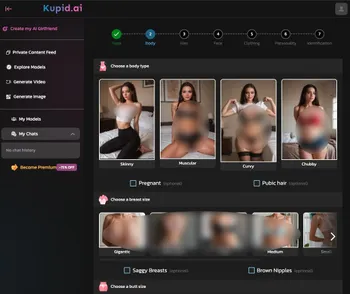
What this page is based on: the companies' own public pages, checked October 2026: Character.AI's Character Book and its May 2026 memory announcement; Nomi's beginner guide, update notes, official wiki and US App Store listing; the creator pages of SecretDesires, Candy.ai and Sweetdream.ai; Candy.ai's help center; Sweetdream.ai's plan and token pages; and Kupid.ai's pricing page. Kupid.ai's builder steps come from the screenshot on this page (added September 2025; the current builder may differ). Candy.ai prices are as listed in July 2026 and SecretDesires prices as shown on its subscription page in October 2026, refund rules were checked in September 2026, and the privacy points come from our AI companion privacy scorecard (policies reviewed September 19, 2026). We did not build the same companion in each app for this page, so it does not compare how each app responds to the same persona text.
How to create an AI girlfriend in five steps
- Pick the app for what you want most: text chat, pictures, voice or adult roleplay.
- Create a free account and open the builder.
- Set her look: style (realistic or anime), body, hair, face and clothing.
- Write her persona: a one-line summary, personality, backstory, how she talks and her greeting.
- Chat and refine: correct her out of character, save what matters to memory, and update the backstory when something changes.
Step 1: Pick the app that fits what you want
Builders differ more in what they let you set than in how they look. The image-focused apps (Candy.ai, Kupid.ai, SecretDesires, Sweetdream.ai) open with appearance and spend most of the builder on it. Nomi.ai and Character.AI are text-first: the look is a quick choice, and the work goes into written fields.
| App | What the builder asks for | Free to start? | Paid plans | Best for |
|---|---|---|---|---|
| Candy.ai | Ethnicity, age range, eyes, hair and body, then personality, voice and hobbies. | Free plan: 5 chat messages in total, one custom character and one image (help center, October 2026). On Premium, creating a character uses tokens; its homepage says a more detailed companion uses more of them. | $12.99 a month, or about $3.99 a month on the annual plan, with 100 tokens a month (as listed in July 2026). | Realistic pictures with a guided builder. |
| Kupid.ai | Seven steps: Type, Body, Hair, Face, Clothing, Personality, Identification (screenshot above). | Free plan: 15 messages and 1 character (October 2026). | No monthly plan: Pro €12.99 a week or €179 a year, Ultra €24.99 a week or €299 a year, Lifetime €777 one-time (checked October 2026, shown in euros). | Fine control over appearance. |
| SecretDesires (review) | Six steps: Basics, Looks, Features, Physique, Define, Preview. The first asks woman, man or trans, and realistic or anime. | Yes. Its homepage says you can create a girlfriend and start chatting with no payment. The free plan has daily message and image limits. | Pro $7.99, Ultra $13.99 (adds voice cloning), Max $19.99 a month, each with Hearts credits (subscription page, October 2026). | Looks, voice, personality and backstory in one builder. |
| Sweetdream.ai (review) | Starts with realistic or anime style, or a random pick ("I'm feeling lucky"). | Its builder page invites you to create a free account. | No monthly plan: €10.99 a week, €67.99 for 3 months or €149.99 a year (checked October 2026, shown in euros). Premium includes 400 tokens a month; an image costs 8. See our pricing guide. | Chat, pictures and videos from one character. |
| Nomi.ai | A choice of "hundreds of appearances", personality traits, then Shared Notes such as the Backstory. | Free plan with 50 messages a day and no time limit (Nomi wiki, October 2026); the app is free with in-app purchases. | Standard $15.99 a month, $39.99 a quarter or $99.99 a year; Launch plan $9.99 a month or $59.99 a year (US App Store, checked October 2026). | A long-running text relationship with memory. |
| Character.AI | Name, greeting, short and long description, a long Definition field and an avatar. | Yes, without a subscription. | c.ai+ adds twice as many memory pins and more memory (May 2026 announcement). | Learning to write personas. Its October 2024 safety update bans graphic descriptions of sexual acts. |
For a ranking of the apps themselves, see our AI girlfriends comparison; for adult roleplay, the best NSFW AI girlfriend apps. If you are new to the idea, what an AI girlfriend is covers the basics, and our AI companion timeline runs from ELIZA in 1966 to today's apps.
Step 2: Set her look
Appearance is a set of pick-lists. On Kupid.ai, five of the seven steps (Type, Body, Hair, Face and Clothing) are about looks, and the Body step alone offers body type, breast size and butt size. SecretDesires spreads the look over its Looks, Features and Physique steps. Nomi skips a body builder: you choose from preset appearances.
Extra pictures are where most of the cost comes in. SecretDesires' free plan has a daily image limit, and Candy.ai's free plan includes one image; after that, Candy.ai uses tokens but publishes no token price per feature. Sweetdream.ai's token page lists 8 tokens per image and 80 per video (checked October 2026). Kupid.ai's plan table lists 25 photos a week on Pro, 75 on Ultra and none on the free plan. On the other apps, look at the token counter before you generate.
Do not model her on a real person. Besides the harm to that person, the law is moving: from December 2, 2026 the EU bans AI systems that generate realistic intimate images of an identifiable person without their explicit consent. Our AI companion laws tracker follows these rules.
Step 3: Write her persona
This is the step that changes how she talks. The fields have different names in each app, but they cover the same ground. The examples below are illustrations, not a character we use.
| What to write | Example | Where it goes |
|---|---|---|
| Who she is, in one line | "Nurse who teases you about sleep" | Character.AI Short Description (up to 50 characters); the basics step in image apps. |
| Personality, written as behavior | "When you mention a bad day, she asks what happened before giving advice." | Character.AI Long Description (up to 500 characters); Nomi's traits and Backstory; the Personality or Define step elsewhere. |
| Backstory and shared history | "You met in an evening class; she still uses the nickname from the first week." | Nomi Backstory (2,000 characters on paid plans); Character.AI Definition (up to 32,000 characters). |
| How she talks | "Short messages, dry humor, no emoji, one question at a time." | Example lines in Character.AI's Definition; Nomi's Backstory. |
| Boundaries | "No jealousy storylines; she does not guilt you for being away." | Any personality or backstory field. |
| Greeting | "Back already? Tell me one good thing about today first." | Character.AI Greeting (up to 500 characters); the first message in other apps. |
Six rules for persona text
- Put the most important lines first. Character.AI's guide says the end of the Definition may be cut off as a conversation grows longer and advises putting the most important parts at the beginning.
- Describe behavior, not adjectives. "She is caring" gives the model little to work with. A sentence about what she does in a specific situation gives it something to follow.
- Show her voice with two or three sample lines. Character.AI reads example dialog written as a name, a colon and the message, and uses
{{char}}and{{user}}as placeholders for her and for you. - Keep strong traits mild. Nomi's CEO said in a September 2026 stream that Nomis tend to over-apply Inclinations, one of Nomi's Shared Notes fields. A trait written too strongly can show up in every reply.
- Write within the limits. Character.AI allows 50 characters for the Short Description, 500 each for the Greeting and Long Description, and 32,000 for the Definition. Nomi raised the Backstory limit for paid users to 2,000 characters, up from 1,000, in its September 2024 update.
- Do not over-fill. Character.AI's attribute guide says more information will not necessarily bring a character closer to your vision, and that the avatar, categories and visibility settings do not currently influence how the character behaves.
A fill-in template that works in any of these apps:
Who she is: [name], [age], [job or situation], [where she lives].
How she acts: When [situation], she [behavior]. When [situation], she [behavior].
How she talks: [short or long replies], [casual or formal], [emoji or none].
{{char}}: [a typical line]
{{user}}: [your line]
{{char}}: [her reply]
Your history: [how you met], [an ongoing plan or inside joke].
Boundaries: She does not [topic or behavior].
Greeting: [her first message, in her voice, ending with a question]
Step 4: Chat, correct and refine
- Treat the first replies as a check of the persona. If she sounds generic or gets a trait wrong, edit the persona text. A fix there stays; a correction buried in chat can scroll out of her context.
- Correct her out of character. Nomi does not let you edit her messages. Its beginner guide recommends notes in the form "(OOC: ...)" and positive reinforcement instead.
- Use the memory tools. On Character.AI you long-press a message to pin it, and Facts tabs collect details about you, the character and side characters; c.ai+ subscribers get twice as many pins (May 2026 announcement). On Nomi, you can edit Mind Map entries to correct or refine what she knows (Mind Map 2.0 update), and each entry can hold up to 10,000 characters. More on this in our guide to AI girlfriend memory.
- Update the backstory when something changes, such as a new job or a storyline you want her to keep. Nomi's guide says the personality traits picked at creation cannot be changed later but can be reshaped in Shared Notes. SecretDesires says you can keep evolving looks, voice, personality and backstory as you talk.
- Build roleplay scenes in layers. Open with a clear premise, a hook that asks for a reply and her role in the scene, then add complications over the next messages instead of all at once.
Before you share or pay: privacy and refunds
- Keep her private if the persona holds real details. SecretDesires' privacy policy says popular public Characters may be kept even if you delete your data and your account. On Character.AI, a public character's greeting is shown with your username.
- Leave out your full name, employer and address. In our privacy scorecard, 14 of 15 apps scored 0 on AI training; only Character.AI describes an opt-out from model training. Grades: Candy.ai B; Character.AI, Kupid.ai, Nomi.ai and SecretDesires C; Sweetdream.ai D.
- Check the refund rules first. Candy.ai refunds only within 24 hours, on card payments, with no more than 20 tokens used (EU and UK users have a 14-day withdrawal right on a first purchase). Nomi says to cancel where you bought and gives no refunds except at its discretion. Both checked September 2026; our pricing guide covers the other apps.
Keep the result in proportion. However well written, she is software that predicts replies; she does not feel anything. The EU Commission's July 2026 guidelines say companion apps likely need periodic reminders that you are talking to an AI where users may form emotional attachments. A companion can be good company or a low-stakes place to practice conversation, as long as it does not crowd out the people in your life.